Blog - //.nkotov
  • Home
  • Tags
  • twrite
  • console
Sign in Subscribe
Free Zabbix module for WHMCS
WHMCS

Free Zabbix module for WHMCS

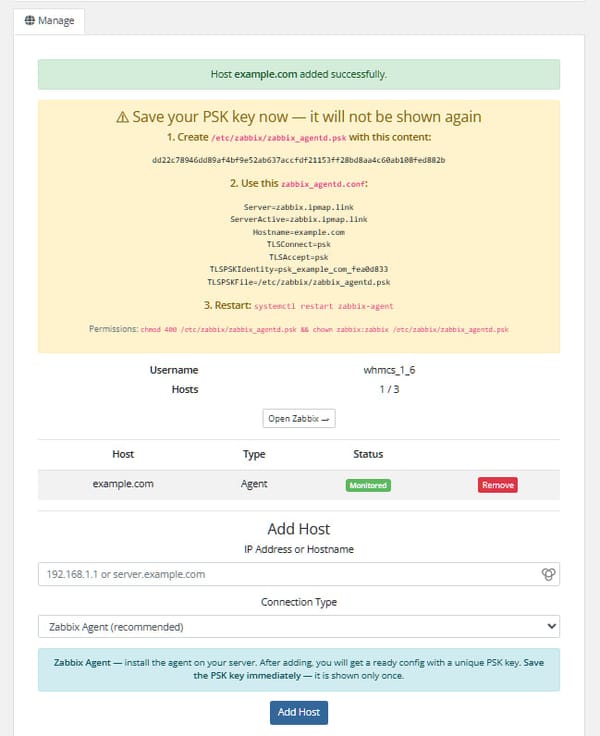
WHMCS provisioning module for Zabbix — sell network monitoring as a service. Automates account creation, suspension, termination and password changes for Zabbix users. Features * Automatic provisioning — creates a dedicated Host Group and user in Zabbix when an order is placed * Tariff plans — each product has its own host limit and Zabbix
02 May 2026 6 min read
Free MailCow module for WHMCS
WHMCS

Free MailCow module for WHMCS

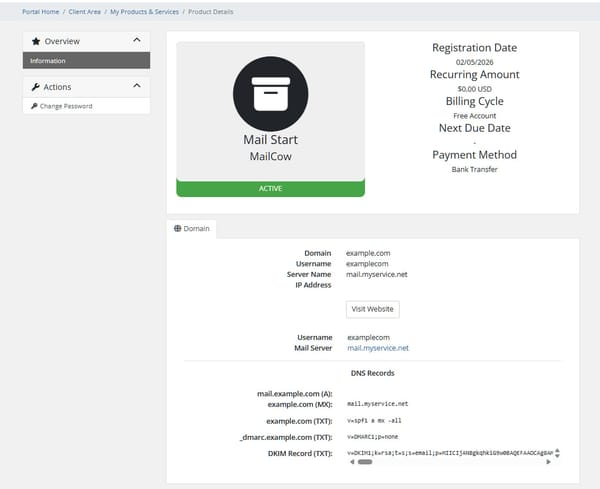
WHMCS provisioning module for Mailcow — automates creation, suspension, termination and password changes for email domains. Features * Automatic provisioning — creates a domain and domain administrator in Mailcow when an order is placed * Suspend / Unsuspend — disables or re-enables the domain and its admin account on demand * Terminate — removes all mailboxes, aliases,
02 May 2026 5 min read
Two global vulnerabilities of April 2026: "Copy Fail" in the Linux kernel and authentication bypass in cPanel/WHM
Hack

Two global vulnerabilities of April 2026: "Copy Fail" in the Linux kernel and authentication bypass in cPanel/WHM

At the end of April 2026, two critical vulnerabilities surfaced simultaneously, affecting millions of servers around the world. One is in the Linux kernel itself, the other in the popular cPanel hosting control panel. Both allow you to get root access, with the first working locally and the second remotely.
30 Apr 2026 3 min read
Scan your website for viruses using maldet + ClamAV
Linux

Scan your website for viruses using maldet + ClamAV

The most effective way is to install LMD (Maldet) and integrate it with the ClamAV engine to speed up scanning. Below is a step-by-step guide for Ubuntu/Debian (on CentOS, the commands are similar, but the package manager is yum). 1. Install ClamAV (engine) This is the base.
29 Jan 2026 1 min read
Install ionCube Loader in Linux Server from PHP
PHP

Install ionCube Loader in Linux Server from PHP

Use command from download: wget http://downloads3.ioncube.com/loader_downloads/ioncube_loaders_lin_x86-64.tar.gz Unarhive: tar -zxvf ioncube_loaders_lin_x86-64.tar.gz Create folder: mkdir /usr/local/ioncube Move file: cp ioncube/ioncube* /usr/local/ioncube Edit file: nano /etc/php.ini Add lines
19 Sep 2025
How to set correct permissions on files and directories?
Linux

How to set correct permissions on files and directories?

Sometimes you need to recursively set permissions on files and folders, but we have a lot of files and folders and it is inconvenient to write chmod every time. So we go via SSH, go to the desired directory and execute: find ./ -type d -exec chmod 755 {} \; find ./ -type f
16 Mar 2025
Install 3-XU Xray (Vmess, Vless, Trojan, ShadowSocks и Wireguard)
VPN

Install 3-XU Xray (Vmess, Vless, Trojan, ShadowSocks и Wireguard)

3-XU - Xray panel with support for multi-protocol multi-user expiration, traffic limitation and IP addresses (Vmess, Vless, Trojan, ShadowSocks and Wireguard) GitHub - MHSanaei/3x-ui: Xray panel supporting multi-protocol multi-user expire day & traffic & ip limit (Vmess & Vless & Trojan & ShadowSocks & Wireguard)
02 Jan 2025 1 min read
We raise VPN Outline and forward traffic through the TOR network
VPN

We raise VPN Outline and forward traffic through the TOR network

Everything will be running on Debian 12. 1. Install the components: apt install docker docker.io docker-compose 2. Run the script: bash -c "$(wget -qO- https://raw.githubusercontent.com/Jigsaw-Code/outline-server/master/src/server_manager/install_scripts/install_server.sh)" 3. After launching, the script
02 Jan 2025 1 min read
Nextcloud on Raspberry Pi with disk encryption.
Docker

Nextcloud on Raspberry Pi with disk encryption.

Package contents: * Raspberry Pi 4 B 🖥 * USB Flash Kingstom 256G USB3.0 We install the minimum 🖥 debian 12 on the raspberry. Next, we install 🖥 docker: apt install docker docker.io docker-compose We install cryptsetup: apt install cryptsetup By default, our entire disk will be marked as the root, but
02 Jan 2025 1 min read
Examples of commands for working with the exim mail server
exim

Examples of commands for working with the exim mail server

With Exim installed, you can work with messages via the command line. Let's look at several commands that you'll need when working: Display messages in the queue: exim -bpr Similar command: mailq View the number of messages that are in the queue: exim -bpc Force start
21 Oct 2024 1 min read
MySQL Optimization
MySQL

MySQL Optimization

Often on virtual servers there is a problem with the database load or the slow operation of the database, so we will give an example of optimizing the MySQL settings. The database configuration file is located at: /etc/my.cnf /etc/mysql/my.cnf Remember that the parameters are configured
21 Oct 2024 3 min read
How to overcome DOS\DDOS attack
Firewall

How to overcome DOS\DDOS attack

When using virtual/dedicated servers, sometimes DOS attacks occur in order to disable a particular site. In this article, we will analyze how to overcome such attacks. First, we must understand: A DOS attack is when many requests are sent from one IP. A DDOS attack is when requests come
21 Oct 2024 1 min read
BASH monitoring server and alert in Telegram
Bash

BASH monitoring server and alert in Telegram

These actions are intended to set up quick server monitoring without launching any separate monitoring. Create folder: mkdir /usr/local/tamagent Create file tamagent.sh: nano /usr/local/tamagent/tamagent.sh Write the script in the file: #!/bin/bash ######################### #GLOBAL VARIABLES ID_USER="XXXXXXX" # ID USER in TELEGRAM
29 Dec 2023 2 min read
cPanel. Raising the virus scanner AiBolit
cPanel

cPanel. Raising the virus scanner AiBolit

The goal was to allow clients to scan their sites for malicious code. The scanner used was the Ai-Bolit fort scanner, which can be found at the link: https://github.com/rorry47/ai-bolit.git First of all, let's create a folder on the server: mkdir /usr/
29 Dec 2023 5 min read
Install and settings WireGuard for Debian 11
Linux

Install and settings WireGuard for Debian 11

WireGuard can be used on a variety of operating systems, including Linux, macOS, Windows, and Android. This makes it a versatile solution for users who want to protect their privacy and security when using the internet. WireGuard can be used to secure communication between remote locations, to connect to a

27 Dec 2023 3 min read
Check website for viruses with Ai-Bolit
Web

Check website for viruses with Ai-Bolit

To check the site for viruses, there is a console utility AI-Bolit. To check, we must go to the console and download the utility from the repository. Since the company that developed the utility has already closed, I had to save the source for myself, so we execute the
27 Dec 2023 2 min read
Get a free Lets Encrypt certificate via acme.sh
Linux

Get a free Lets Encrypt certificate via acme.sh

We will use the acme.sh console utility to install the certificate. The official repository is located here: https://github.com/acmesh-official/acme.sh Installation is very simple, use the command: curl https://get.acme.sh | sh Next, to get a certificate, use the command: acme.sh --issue --server
27 Dec 2023 1 min read
Simple MySQL Queries
MySQL

Simple MySQL Queries

This note may be useful for those who are just starting to use the MySQL. Everything happens for the first time. For example, you got a job, or wanted to work in a project where this system was used. Reading manuals is of course helpful. But the return on reading
27 Dec 2023 3 min read
Simple Python Script to Distort Images
Python

Simple Python Script to Distort Images

The script itself looks like this: import numpy as np from PIL import Image def quad_as_rect(quad): if quad[0] != quad[2]: return False if quad[1] != quad[7]: return False if quad[4] != quad[6]: return False if quad[3] != quad[5]: return False return True def
27 Dec 2023 2 min read
Adding Noise to Elements
CSS

Adding Noise to Elements

To add noise to a page or elements, use the following javascript code: const noise = () => { let canvas, ctx; let wWidth, wHeight; let noiseData = []; let frame = 0; let loopTimeout; // Create Noise const createNoise = () => { const idata = ctx.createImageData(wWidth, wHeight); const buffer32 = new Uint32Array(idata.data.buffer); const len = buffer32.
27 Dec 2023 1 min read
Update Root Certificate | “server certificate verification failed” error
Linux

Update Root Certificate | “server certificate verification failed” error

When upgrading packages on non-upgraded systems, an error can sometimes occur if old certificates are present: server certificate verification failed. CAfile: /etc/ssl/certs/ca-certificates.crt To renew certificates, do the following:. Centos: Install if not: yum install ca-certificates And update: update-ca-trust force-enable Ubuntu\
27 Dec 2023 1 min read
RoundCube – Enable recapcha on login
RoundCube

RoundCube – Enable recapcha on login

We connect to the console and go to the folder with attachments in roundcube: cd ../plugins/ Cloning the google captcha plugin repository: git clone https://github.com/dsoares/rcguard.git rcguard Don’t forget to set the correct owner and user, for example: chown -R www-data:www-data rcguard
26 Dec 2023 1 min read
Telegram chat bot without libraries in PHP
API-s

Telegram chat bot without libraries in PHP

First, let’s write the main code that will determine the sending and receiving of requests from the telegram servers: <?php $data = file_get_contents('php://input'); $data = json_decode($data, true); if (empty($data['message']['chat']['id'])) { exit(); } define('
26 Dec 2023 4 min read
WordPress – several domains for the site

WordPress – several domains for the site

In order to make a site on WordPress pratsyuvav on a number of domains. write in wp-config next code: $array[0] = array( 'domain1.com', 'domain2.com', 'domain3.com', 'domain4.com', ); if (array_intersect(explode(' ', $_SERVER['HTTP_HOST'
26 Dec 2023
Fix mail on Ubuntu – VestaCP
Linux

Fix mail on Ubuntu – VestaCP

When installing VestaCP on Ubuntu, mail errors may occur. For example: * Unsuccessful connection to IMAP server * Invalid HELO name * AUTHENTICATE LOGIN: in /usr/share/roundcube/program/lib/Roundcube/rcube_imap.php .. * Initialization failed: namespace configuration error: inbox=yes namespace missing The first step is to repair the RoundCube. Go to
26 Dec 2023 2 min read
Page 1 of 2 Older Posts →
Blog - //.nkotov © 2026
  • Donates
Powered by Ghost